Oasis Select
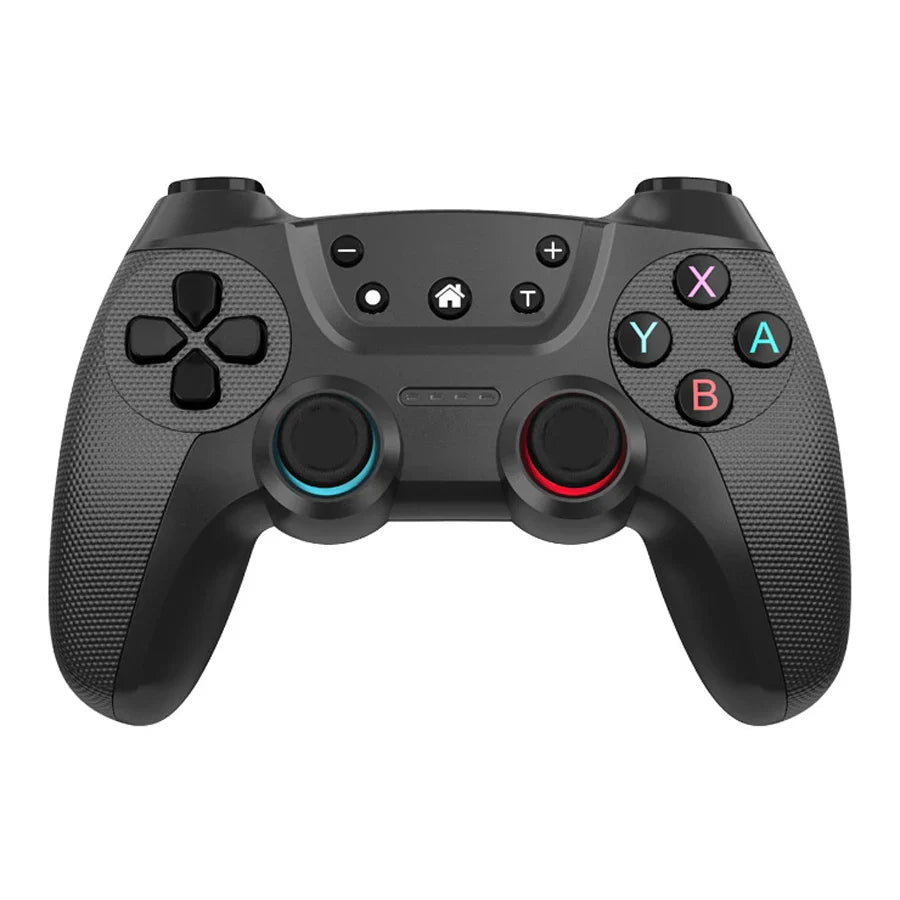
Wireless Bluetooth Gamepad for Nintendo Switch, Android & PC
Wireless Bluetooth Gamepad for Nintendo Switch, Android & PC
Couldn't load pickup availability
AyeBeau Wireless Bluetooth Gamepad – Play Your Way, Anywhere
Level up your gaming sessions with the AyeBeau Wireless Bluetooth Gamepad — a versatile, multi-platform controller built for Nintendo Switch, Switch OLED, Switch Lite, PS3, Android smartphones, iOS 13+, and Windows PC. With a comfortable ergonomic grip, dual vibration motors, and a built-in rechargeable battery, this gamepad delivers a premium gaming feel at an accessible price. Made in Mainland China.
🎮 Multi-Platform Compatibility
- Nintendo Switch / Switch OLED / Switch Lite — connect via USB cable (wired) or Bluetooth (wireless)
- Android smartphones — seamless Bluetooth wireless pairing
- iOS 13+ — Bluetooth wireless support
- Windows PC — wired XINPUT (PC360) and DINPUT modes supported
- PS3 — compatible for expanded gaming flexibility
⚡ Key Features
- Bluetooth Wireless + Wired Modes: Switch between wireless Bluetooth and USB wired connection effortlessly — unplugging the cable automatically restores Bluetooth mode on Switch.
- 500mAh Rechargeable Battery: Just 3 hours of charging delivers up to 8 hours of continuous gameplay.
- Dual Vibration Motors: Feel every crash, shot, and impact with built-in dual rumble motors — ideal for racing and shooting games.
- Built-in Turbo Function: Choose from 3 adjustable turbo speeds — 5, 15, or 30 shots — to match your playstyle.
- 6-Axis Gyroscope: Ultra-sensitive motion control for precise, immersive gameplay.
- High-Sensitivity Buttons: Pressure-sensitive arrow keys, full 360° joysticks with no dead zone, and responsive action buttons for lightning-fast reactions.
- Non-Linear Trigger Buttons: Smooth, accurate analog trigger response for natural in-game control.
🔌 Multiple Connection Modes Explained
- Switch Wired: Connect via USB cable to your Switch console. Press Y+HOME to enable wired mode. Disconnect the cable to revert to Bluetooth automatically.
- PC-360 (XINPUT) Wired: Download the PC360 driver on Windows, connect via USB, then press buttons 1+10 simultaneously to activate. LED2 & LED3 remain lit.
- PC DINPUT Wired: Alternative Windows mode for broader PC game compatibility.
- Bluetooth (Android/iOS): Pair wirelessly with Android devices or iOS 13+ smartphones for mobile gaming on the go.
📦 What's in the Box
- 1× Wireless Bluetooth Gamepad Controller
- 1× USB Charging Cable
- 1× User Manual
🔗 You May Also Like
- 1.32" AMOLED Smart Watch – Bluetooth Call, Fitness & Health Tracker
- 1.44" Touch Smartwatch – Bluetooth Calls & Fitness Tracker
For more information on gaming safety and screen time guidelines, visit the CDC's resource on healthy screen habits.
Frequently Asked Questions
Q: Is the AyeBeau Wireless Gamepad compatible with Nintendo Switch OLED and Switch Lite?
A: Yes! This gamepad is fully compatible with the Nintendo Switch, Nintendo Switch OLED, and Nintendo Switch Lite. It connects via USB cable for wired play or via Bluetooth for wireless gaming — and switching between the two modes is seamless.
Q: How do I connect this Bluetooth gamepad to my Android or iOS phone?
A: Simply put the controller into Bluetooth pairing mode and search for it in your phone's Bluetooth settings. It supports Android devices and iOS 13 or later smartphones, making it a great option for mobile gaming on the go.
Q: How long does the battery last, and how do I charge it?
A: The built-in 500mAh rechargeable battery provides up to 8 hours of gameplay on a single charge. Charging takes approximately 3 hours using the included USB cable — no batteries required.
Q: Can I use this gamepad on a Windows PC?
A: Absolutely. The gamepad supports both XINPUT (PC360) and DINPUT wired modes on Windows PC. For PC360 mode, download and install the PC360 driver, connect via USB, then press buttons 1 and 10 simultaneously. DINPUT mode activates automatically for broader game compatibility.
Q: What is the Turbo function and how do I use it?
A: The built-in Turbo function lets you choose from three rapid-fire speeds — 5, 15, or 30 shots per cycle. This is especially useful in action, shooting, and fighting games where repeated button presses give you a competitive edge.