Peaceful Pleasures Health and Wellness
VODOOL Auto Clicker for Phone – 108-Speed Screen Tapper
VODOOL Auto Clicker for Phone – 108-Speed Screen Tapper
Couldn't load pickup availability
VODOOL Auto Clicker – Hands-Free Phone Screen Tapper for Games, Live Streams & More
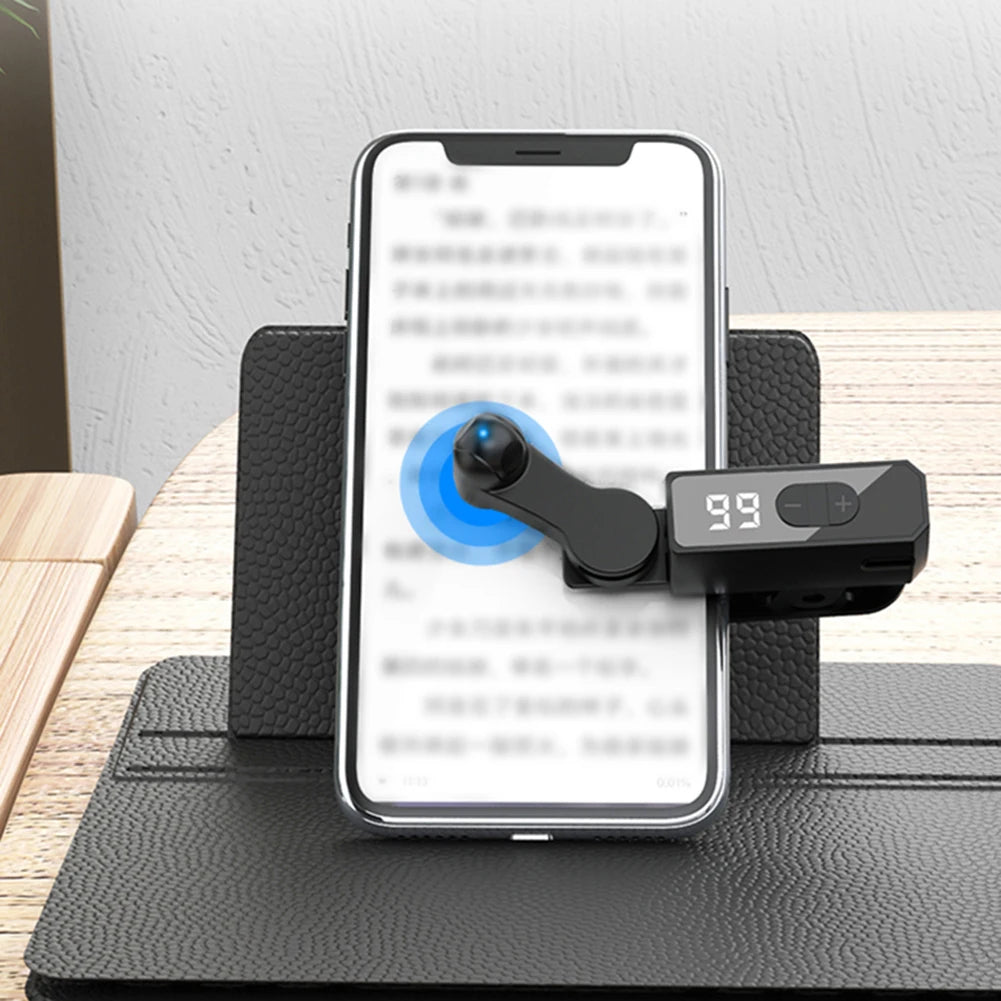
Meet the VODOOL Auto Clicker — a compact, wireless phone screen tapper designed to automate rapid tapping so you can game, earn rewards, boost live-stream engagement, and breeze through repetitive tasks without lifting a finger. With 108 adjustable speed levels (from 1 click per 9 seconds up to 99 clicks per second) and a whisper-quiet design, this device is the ultimate hands-free companion for your smartphone.
Key Features
- Silent Spatial Mapping Technology: Ditches traditional mechanical clicking in favour of advanced spatial-mapping click technology for near-zero noise output, a longer device lifespan, and a gentler touch on your phone screen.
- 108 Adjustable Speed Levels: Dial in the exact tapping speed you need — from a leisurely single tap every 9 seconds all the way up to a blazing 99 clicks per second. Perfect for mobile games, auto-like tasks, live-broadcast engagement, novel page-turning, and reward apps.
- HD LED Digital Display: The built-in high-definition LED display clearly shows your current click speed at a glance, making it effortless to set and monitor your preferred level.
- Compact & Portable: At just 89 × 36 × 19.7 mm and 58 g, this pocket-sized gadget clips onto virtually any smartphone and slips easily into a bag or pocket for on-the-go use.
- Type-C Charging + Use While Charging: The built-in 120 mAh battery supports charging via Type-C while the device is running, so your automation never has to stop. A red indicator flashes when battery is low, stays solid red while charging, and switches off when fully charged.
- Memory Function: Powers on and automatically loads your last-used speed setting — no need to reconfigure every time.
- Universal Clip-On Design: The adjustable fixing clip attaches securely to most smartphones. Simply rotate the click head to your desired screen position and you're ready to go.
Specifications
| Brand | VODOOL |
| Model | Auto Clicker |
| Color | Black |
| Click Speed Range | 1 click / 9 sec – 99 clicks / sec (108 levels) |
| Display | HD LED Digital Display |
| Connector | Type-C |
| Built-in Battery | 120 mAh |
| Dimensions | 89 × 36 × 19.7 mm / 3.5 × 1.54 × 0.78 in |
| Weight | 58 g |
| Certification | CE |
| Origin | Made in Mainland China |
What's in the Box?
- 1 × Auto Clicker Device
- 1 × Type-C Data / Charging Cable
- 1 × Instruction Manual
How to Use
- Open the fixing clip and attach it firmly to your smartphone.
- Rotate the click head to the exact position on your screen you want tapped.
- Press the On/Off button to power on; the LED display will show your current speed level.
- Press and hold the Gear +/– button to quickly adjust tapping speed.
- Press the Start/Pause button to begin automatic tapping.
- Press the On/Off button again when finished — the speed setting is saved for next time.
Note: Due to variations in monitor settings and lighting conditions, the actual product colour may differ slightly from images shown. Please allow ±1–2 cm in measurements due to manual measuring methods.
Explore More Gadgets & Accessories
- "1% Better Every Day" Motivational Canvas Wall Art Print
- "Best Seat In The House" Retro Quote Canvas Wall Art Print
For general guidance on safe and responsible use of electronic consumer gadgets, visit the U.S. Consumer Product Safety Commission (CPSC).
Learn more: Mobile phone accessories
Frequently Asked Questions
Q: What smartphones is this auto clicker compatible with?
A: The VODOOL Auto Clicker features a universal clip-on design that fits most smartphones regardless of brand or operating system. The adjustable fixing clip and rotatable click head allow it to work on a wide range of phone sizes and screen layouts.
Q: Can I charge the device while it's running?
A: Yes! The built-in 120 mAh battery supports pass-through charging via the Type-C port, so you can keep the auto clicker running uninterrupted while it charges. The LED battery indicator keeps you informed of the charge status at all times.
Q: How many speed levels does the auto clicker have, and how do I change them?
A: The device offers 108 speed levels ranging from 1 click every 9 seconds up to 99 clicks per second. Simply press and hold the Gear +/– buttons to scroll through levels quickly until you reach your desired tapping speed. The HD LED display shows your current setting in real time.
Q: Will it remember my speed setting after I turn it off?
A: Yes. The auto clicker features a built-in memory function that saves your last-used speed setting. The next time you power it on, it will automatically load that setting and enter standby mode, ready to use without any reconfiguration.
Q: Is the auto clicker noisy to use?
A: No. The device uses silent spatial-mapping click technology rather than traditional mechanical clicking, resulting in near-zero operational noise — ideal for use in quiet environments or during live broadcasts.