Peaceful Pleasures Health and Wellness
USB Dongle Receiver for Logitech G913 G915 G815 G813 TKL Keyboard
USB Dongle Receiver for Logitech G913 G915 G815 G813 TKL Keyboard
Couldn't load pickup availability
Replace Your Lost or Damaged Wireless Keyboard Receiver Instantly
Lost your USB dongle and your wireless keyboard is now useless? This replacement USB dongle receiver adapter is purpose-built for Logitech G913, G915 TKL, G815, and G813 TKL wireless mechanical gaming keyboards. Simply plug it in, pair it using the G HUB software, and you're back in the game — no need to buy a whole new keyboard.
Key Specifications
- Hardware Interface: USB
- Compatible Devices: Wireless Mechanical Gaming Keyboard
- Data Link Protocol: USB
- Item Weight: 0.01 kg (ultra-lightweight)
- Compatible Models: Logitech G913, G915 TKL, G815, G813 TKL
- Type: Wireless Keyboard USB Receiver / Dongle
How to Pair Your Receiver
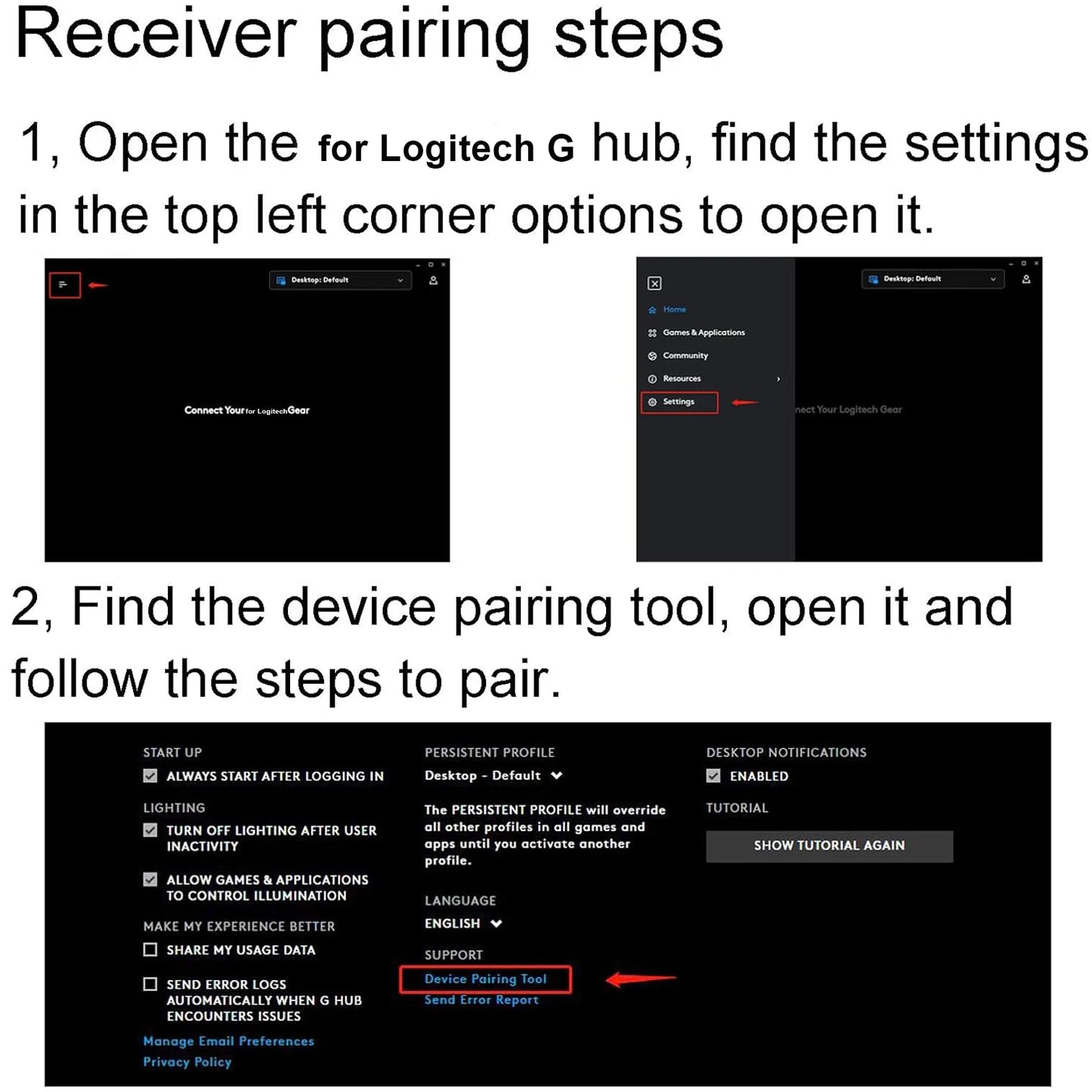
- Download G HUB Software — Install the official Logitech G HUB software on your PC or Mac.
- Insert the Receiver — Plug the USB dongle into an available USB port on your computer.
- Select PAIR — Open G HUB, navigate to the keyboard settings, and click the PAIR option to complete the connection. Refer to the product images for detailed step-by-step guidance.
Why Choose This Replacement Dongle?
- ✅ Exact Replacement — Designed specifically for Logitech G-series TKL wireless keyboards
- ✅ Easy Pairing — Quick setup via Logitech G HUB software
- ✅ Compact & Portable — Tiny form factor, easy to store and carry
- ✅ Reliable USB Connection — Stable wireless link to restore your keyboard functionality
- ✅ Cost-Effective — Save money by replacing just the dongle instead of the entire keyboard
Made in Mainland China.
Related Products You May Like
- 1-In-2-Out HDMI Splitter Cable 1080P 3D – TV Monitor Projector
- 1.8M DisplayPort to HDMI Cable 4K DP Adapter – PC TV Monitor
For more information on USB standards and peripheral connectivity, visit the National Institute of Standards and Technology (NIST) – Electronics.
Frequently Asked Questions
Q: Which keyboard models is this USB dongle receiver compatible with?
A: This replacement USB dongle receiver is compatible with the Logitech G913, G915 TKL, G815, and G813 TKL wireless mechanical gaming keyboards. Please confirm your keyboard model before purchasing to ensure compatibility.
Q: How do I pair this USB dongle receiver with my Logitech wireless keyboard?
A: To pair the receiver, first download and install the official Logitech G HUB software on your computer. Then insert the USB dongle into an available USB port. Open G HUB, go to your keyboard's settings, and click the PAIR option. Follow the on-screen instructions or refer to the product images for detailed steps.
Q: Can I use this dongle receiver with keyboards other than the listed Logitech models?
A: No, this USB dongle is specifically designed as a replacement for Logitech G913, G915 TKL, G815, and G813 TKL wireless keyboards only. It will not be compatible with other keyboard brands or Logitech models outside of these listed.
Q: Is any special software required to use this USB keyboard receiver?
A: Yes, the Logitech G HUB software is required to complete the pairing process between this USB dongle and your compatible Logitech wireless mechanical gaming keyboard. The software is available as a free download from Logitech's official website.