Peaceful Pleasures Health and Wellness
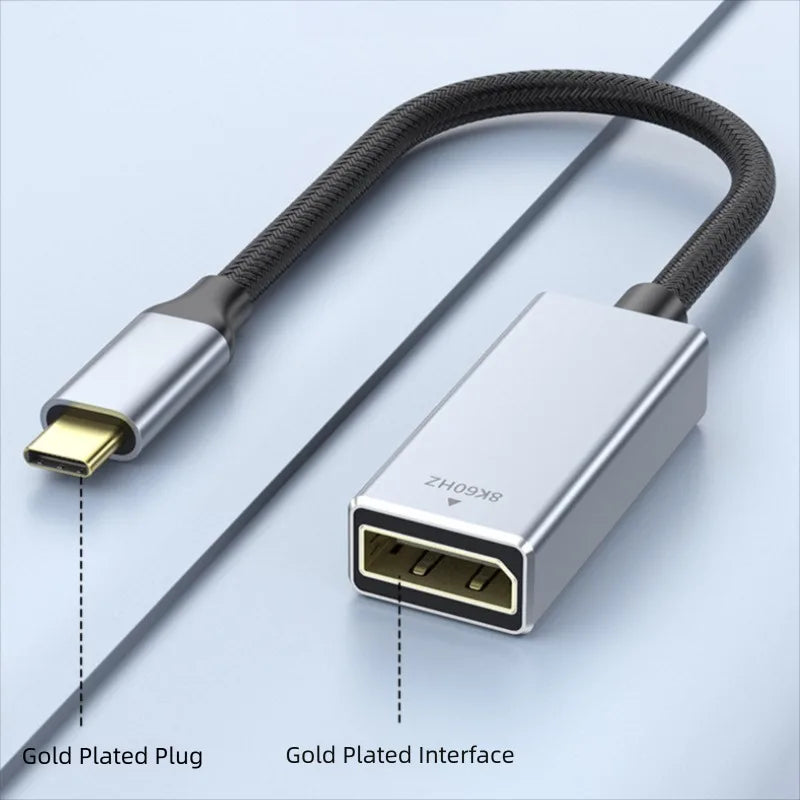
USB-C to DisplayPort 1.4 Cable 8K@60Hz 4K@144Hz DP Adapter
USB-C to DisplayPort 1.4 Cable 8K@60Hz 4K@144Hz DP Adapter
Couldn't load pickup availability
USB-C to DisplayPort 1.4 Adapter Cable – 8K@60Hz, 4K@144Hz
Unlock stunning ultra-high-definition visuals with this premium USB-C to DisplayPort 1.4 cable. Whether you're a creative professional, gamer, or remote worker, this adapter delivers flawless video output from your MacBook Pro, MacBook Air M1, or any USB-C / Thunderbolt 3 device directly to your DisplayPort monitor, TV, or projector. Engineered for 32.4Gbps bandwidth, it supports resolutions up to a breathtaking 8K@60Hz and refresh rates as high as 4K@144Hz for buttery-smooth gaming and content creation.
Made in Mainland China.
⚡ Key Features
- 8K HDR DisplayPort 1.4 Support: USB-C Male to DisplayPort 1.4 Female adapter (32.4Gbps) supports resolutions up to 7680×4320 (8K@60Hz). Perfect for extending your workspace on a UHD monitor, streaming to a UHD TV, or presenting via projector.
- High-Performance Refresh Rates: Supports 8K@60Hz, 4K@144Hz / 120Hz / 60Hz, 2K@240Hz / 165Hz, and 1080p — ideal for both professional workflows and high-refresh gaming displays.
- Dynamic HDR & 3D Visual Effects: Experience vibrant colors and deep contrast with Dynamic HDR support and immersive 3D visual output.
- Sleek, Durable Build: Features a braided nylon cable for long-lasting flexibility and durability, plus a premium aluminum alloy housing for efficient heat dissipation and superior signal shielding.
- Universal USB-C / Thunderbolt 3 Compatibility: Works seamlessly with MacBook Pro, MacBook Air (M1/M2), iPad Pro, Dell XPS, Surface Pro, and more — any device with a USB-C port that supports DisplayPort Alt Mode.
- Compact & Plug-and-Play: No drivers needed. Just plug in and go. Lightweight and portable enough to toss in your bag for meetings, travel, or on-the-go productivity.
⚠️ Compatibility Note: This adapter is not compatible with Samsung Odyssey G7 or HP Reverb VR Generation 1.
📦 What's in the Box
- 1 × USB-C to DisplayPort 1.4 Adapter Cable
📋 Technical Specifications
| Connector A | USB-C (Type-C) Male |
| Connector B | DisplayPort (DP) Female |
| Standard | DisplayPort 1.4 |
| Bandwidth | 32.4 Gbps |
| Max Resolution | 8K @ 60Hz (7680×4320) |
| High Refresh Rates | 4K@144Hz, 2K@240Hz, 1080p |
| HDR Support | Yes – Dynamic HDR |
| Cable Jacket | Braided Nylon |
| Housing Material | Aluminum Alloy |
| Origin | Mainland China |
🔗 Related Products You May Also Like
- 1-In-2-Out HDMI Splitter Cable 1080P 3D – TV Monitor Projector
- 1-In-2-Out HDMI Splitter Cable 1080P | PC, PS4, Xbox, TV
Frequently Asked Questions
Q: Is this USB-C to DisplayPort adapter compatible with MacBook Pro and MacBook Air M1?
A: Yes! This USB-C to DisplayPort 1.4 cable is fully compatible with MacBook Pro and MacBook Air M1 (and M2), as well as any laptop or tablet with a USB-C or Thunderbolt 3 port that supports DisplayPort Alt Mode. Simply plug in and enjoy 8K or 4K output with no drivers required.
Q: What resolutions and refresh rates does this DisplayPort 1.4 adapter support?
A: This DP 1.4 adapter supports a wide range of high-performance display modes: 8K@60Hz, 4K@144Hz, 4K@120Hz, 4K@60Hz, 2K@240Hz, 2K@165Hz, and standard 1080p. It uses the full 32.4Gbps bandwidth of DisplayPort 1.4 for smooth, lag-free visuals.
Q: Does this cable support HDR?
A: Yes. This adapter supports Dynamic HDR, which enables richer color depth and contrast adjustments on a scene-by-scene or even frame-by-frame basis — ideal for watching HDR content or using HDR-capable monitors for creative work.
Q: What devices is this adapter NOT compatible with?
A: This USB-C to DisplayPort adapter is not compatible with the Samsung Odyssey G7 monitor or the HP Reverb VR Headset (Generation 1). For all other standard DisplayPort monitors, TVs, and projectors, it should work seamlessly.
Q: Do I need to install any drivers to use this USB-C to DisplayPort cable?
A: No driver installation is needed. This is a true plug-and-play adapter. Simply connect your USB-C device to your DisplayPort display and it will be recognized automatically by your operating system.