Peaceful Pleasures Health and Wellness
Transparent Wireless Bluetooth Gaming Mouse | 3-Mode Silent
Transparent Wireless Bluetooth Gaming Mouse | 3-Mode Silent
Couldn't load pickup availability
Transparent Wireless Bluetooth Gaming Mouse – 3-Mode, Silent, Rechargeable
Meet your next favorite mouse. This full transparent wireless gaming mouse combines futuristic style with practical tri-mode connectivity — letting you pair via Bluetooth BT1, Bluetooth BT2, or 2.4GHz USB for seamless switching between up to 3 devices. Whether you're gaming, working from home, or browsing on your iPad, this ambidextrous mouse delivers smooth, quiet, and reliable performance.
Key Features
- 3-Mode Wireless Connection: Connect via BT1, BT2, or 2.4GHz USB receiver. Compatible with Windows, Android, macOS, and iPad (iOS 13+). Switch modes with the dedicated button on the bottom.
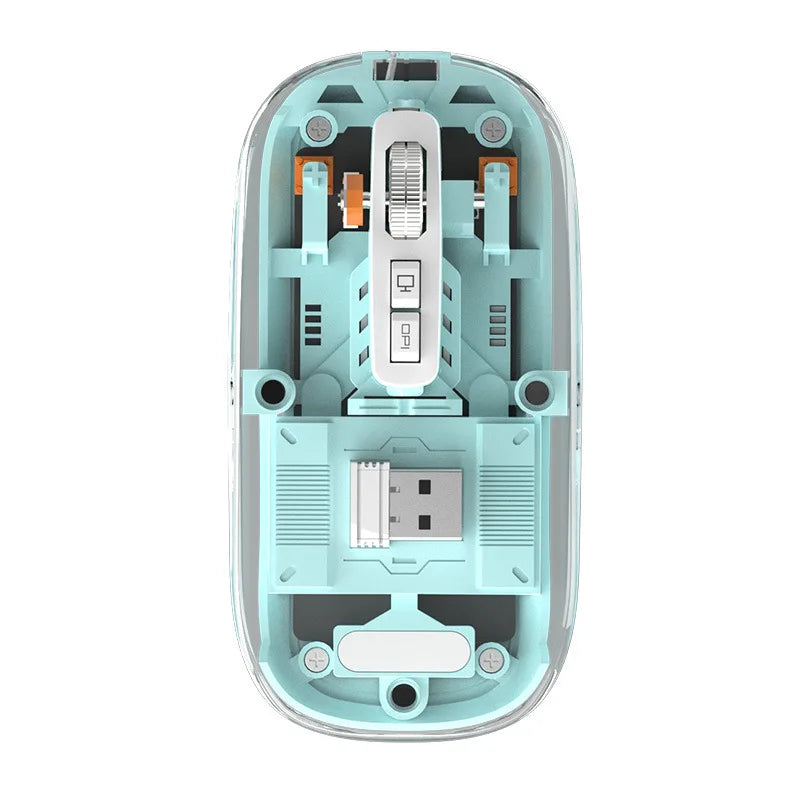
- Full Transparent Design: A magnetic shell with a unique see-through body gives this mouse a high-tech look that stands out on any desk setup.
- USB-C Rechargeable: Built-in rechargeable battery charged via included USB-C cable — no more buying disposable batteries. LED battery indicator shows charge level and flashes when charging or when power is low.
- 3 Adjustable DPI Levels: Instantly switch between 1000, 1200, and 1600 DPI to match your precision needs — from detailed design work to fast-paced gaming.
- Silent Click Technology: Left and right buttons are engineered to minimize click noise, keeping your workspace or gaming space quiet and distraction-free.
- One-Click Desktop Shortcut: Jump back to your desktop in an instant. On Windows it works as a home button; on Mac it functions as ⌘D.
- Ambidextrous Ergonomic Design: Comfortable for both left- and right-handed users, ideal for long sessions.
- Colorful Breathing Light: The mouse logo features a randomly cycling RGB breathing light effect that adds a touch of flair to your setup.
- 5-Button Layout: Includes standard left/right click, scroll wheel, DPI switch, and a dedicated desktop shortcut button.
How to Connect
2.4GHz USB Mode
Open the magnetic cover, remove the stored USB receiver, plug it into your computer's USB port, switch the Mode button to 2.4G, and power on. Ready to use immediately.
Bluetooth Mode
Power on the mouse, switch the Mode button to BT1 or BT2, then pair with your device via its Bluetooth settings. Connect two devices simultaneously!
Important Notes
- Fully charge the mouse before first use.
- Battery indicator light turns white during use; flashes when battery is low.
- If your computer only has a USB-C port, you will need a USB-A to USB-C adapter (not included) to use the 2.4GHz USB receiver.
Specifications
| Connectivity | Bluetooth BT1, Bluetooth BT2, 2.4GHz USB |
| DPI | 1000 / 1200 / 1600 (adjustable) |
| Number of Buttons | 5 |
| Hand Orientation | Ambidextrous (Both Hands) |
| Power Source | Built-in Rechargeable Battery (USB-C) |
| Compatible OS | Windows, macOS, Android, iPad iOS 13+ |
| Country of Origin | Made in Mainland China |
Pair With More Tech Accessories
Looking for more connectivity options? Check out our 10-in-1 Multi-Head USB Charging Cable for universal charging convenience, or browse our Bluetooth Remote Selfie Stick Tripod for more wireless Bluetooth accessories.
Frequently Asked Questions
Q: Can this wireless Bluetooth mouse connect to an iPad or tablet?
A: Yes! The mouse supports Bluetooth connectivity and is compatible with iPad running iOS 13 and above. Simply switch the mode to BT1 or BT2 and pair it via your device's Bluetooth settings.
Q: How long does the rechargeable battery last, and how do I charge it?
A: The built-in rechargeable battery is charged using the included USB-C cable. The LED battery indicator will flash when the battery is low. For best results, fully charge the mouse before its first use.
Q: Is this gaming mouse compatible with Mac computers?
A: Yes, this wireless mouse is compatible with macOS via both Bluetooth and 2.4GHz USB modes. The one-click desktop shortcut button functions as the ⌘D shortcut on Mac.
Q: What DPI settings are available, and how do I switch between them?
A: This mouse offers three DPI levels: 1000, 1200, and 1600. You can cycle through them using the dedicated DPI button on the mouse, allowing you to adjust cursor speed and sensitivity on the fly.