Peaceful Pleasures Health and Wellness
SO-DIMM to DIMM Adapter Card | DDR3 DDR4 DDR5 Laptop to Desktop RAM
SO-DIMM to DIMM Adapter Card | DDR3 DDR4 DDR5 Laptop to Desktop RAM
Couldn't load pickup availability
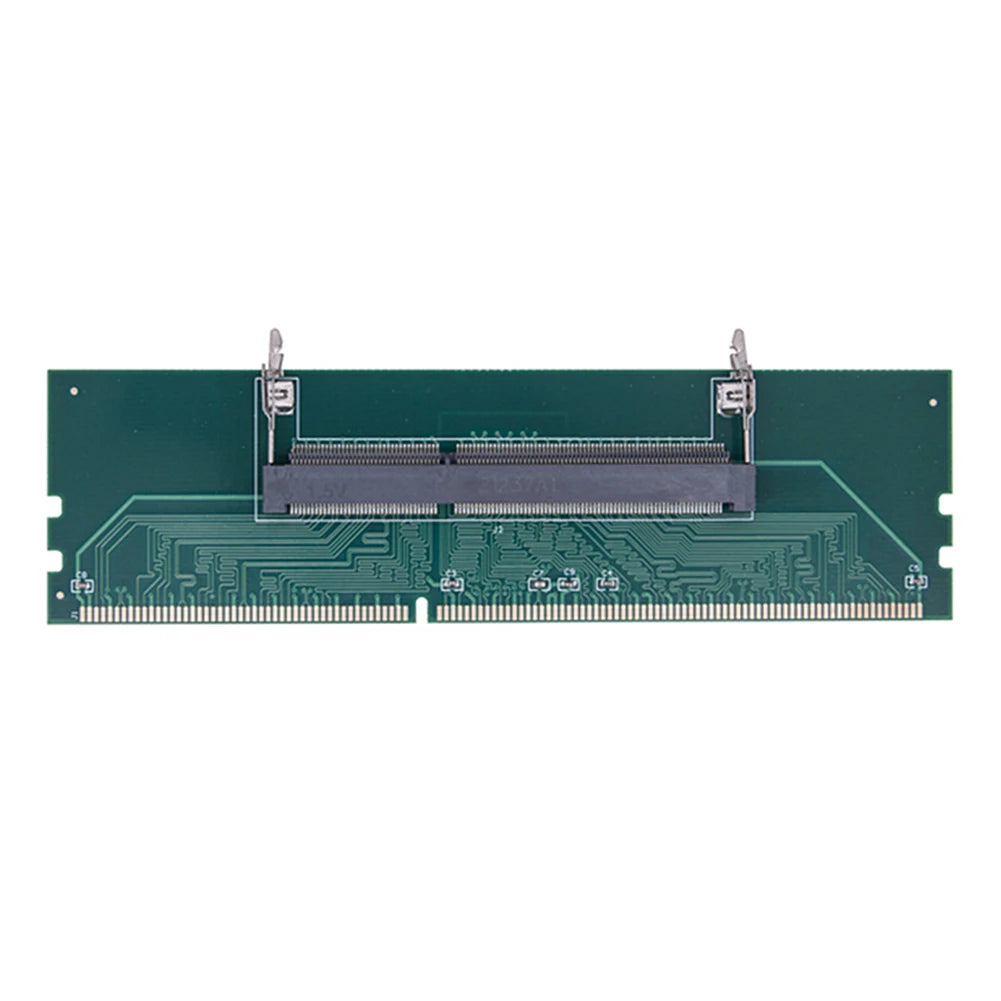
SO-DIMM to PC DIMM Memory Adapter Card — Use Laptop RAM in Your Desktop
Upgrade your desktop's memory without buying all-new hardware. This SO-DIMM to PC DIMM Memory Adapter Card lets you insert laptop-style notebook RAM (SO-DIMM) directly into a standard desktop motherboard DIMM slot. Compatible with DDR3, DDR4, and DDR5 memory modules, it's a smart, budget-friendly bridge between laptop and desktop memory form factors.
Key Features
- Broad Compatibility: Works with DDR3, DDR4, and DDR5 SO-DIMM laptop memory modules, supporting a wide range of motherboard configurations.
- Easy Installation: Simply seat your SO-DIMM module into the adapter card and insert it into your desktop's standard DIMM slot — no special tools or technical expertise required.
- Durable Construction: Built with high-quality materials and precision-engineered gold-finger connectors for reliable, long-lasting electrical contact.
- Versatile Use Case: Ideal for repurposing spare laptop RAM sticks, testing memory modules, or building cost-effective desktop upgrade solutions.
- Cost-Effective Upgrade: Avoid costly motherboard replacements — simply adapt your existing SO-DIMM memory for use in desktop systems.
Specifications
| Type | Memory Adapter Card (SO-DIMM to DIMM) |
| Supported Memory | DDR3, DDR4, DDR5 |
| DDR3 Dimensions | 13.4 × 3.7 cm / 5.3 × 1.5 inch |
| DDR4 Dimensions | 13.4 × 3.6 cm / 5.3 × 1.4 inch |
| DDR5 Dimensions | 13.4 × 2.8 cm / 5.3 × 1.1 inch |
| Package Contents | 1 × SO-DIMM to DIMM Memory Adapter Card |
| Country of Origin | Made in China |
Installation Tips
- Power off your desktop completely and disconnect the power cord before handling any memory components.
- Insert your SO-DIMM laptop RAM module securely into the adapter card's SO-DIMM slot.
- Align the adapter card with your desktop motherboard's standard DIMM slot and press firmly until the retention clips click into place.
- If you notice contact issues over time, carefully clean the gold fingers with a dry eraser to remove oxidation, then reseat the module.
Good to Know
Always verify that your specific SO-DIMM module's DDR generation matches the variant of this adapter card you select (DDR3, DDR4, or DDR5). DDR generations are not cross-compatible. For more on PC memory standards, visit the U.S. Department of Energy's Electronics resource.
Note: Due to differences in monitors and lighting, actual product color may vary slightly from images. Please allow a 1–2 cm measuring tolerance due to manual measurement.
Explore More from Our Store
- "1% Better Every Day" Motivational Canvas Poster | Wall Art
- "Everything Is Fine" Funny Men's Graphic T-Shirt | Cotton Tee
Learn more: MSX
Frequently Asked Questions
Q: What is an SO-DIMM to DIMM adapter card and what does it do?
A: An SO-DIMM to DIMM adapter card is a converter board that allows you to use a smaller laptop-format SO-DIMM memory module inside a standard full-size desktop DIMM slot. It bridges the physical and electrical interface difference between the two form factors, letting you repurpose laptop RAM for desktop use.
Q: Which DDR memory generations are supported?
A: This adapter card is available in DDR3, DDR4, and DDR5 variants. Each variant is specifically engineered for its respective memory generation — DDR generations are not interchangeable, so please select the correct version that matches your SO-DIMM module.
Q: Will this SO-DIMM to DIMM adapter card work with any desktop motherboard?
A: The adapter card is designed to fit standard desktop DIMM slots. However, compatibility also depends on whether your motherboard's BIOS and chipset support the specific SO-DIMM module you're inserting. It is recommended to verify your motherboard's supported memory specifications before purchasing.
Q: What should I do if my memory is not recognized after installing the adapter?
A: First, ensure the adapter is firmly seated in the DIMM slot. If the module is still not detected, remove it, clean the gold fingers gently with a dry eraser to remove any oxidation, and reseat the adapter. Also confirm that the DDR generation of the adapter matches your memory module.