Peaceful Pleasures Health and Wellness
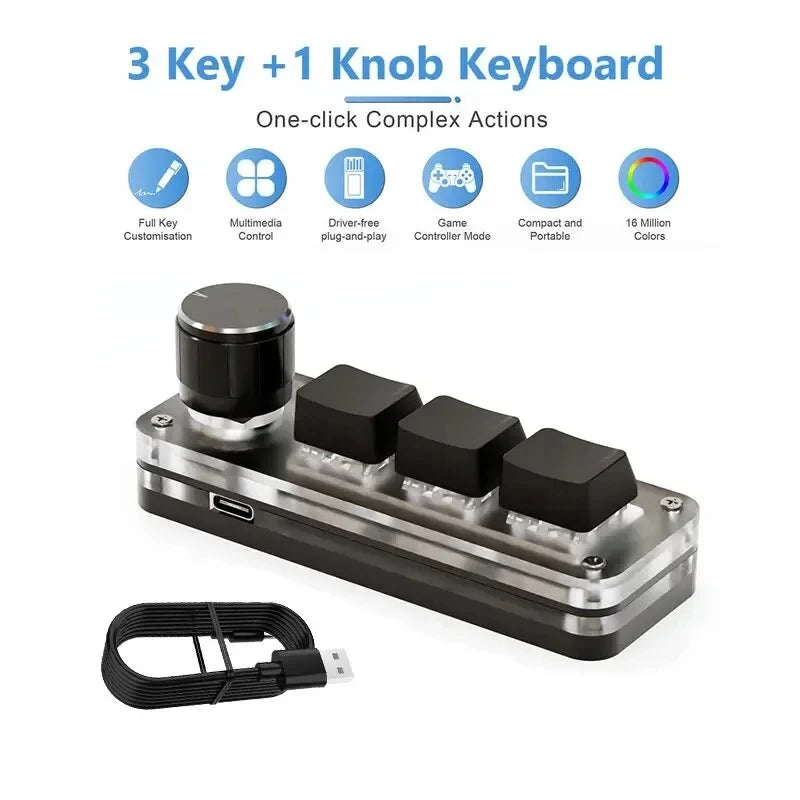
RGB Macro Mechanical Keypad – 3 Keys + 1 Knob, Programmable
RGB Macro Mechanical Keypad – 3 Keys + 1 Knob, Programmable
Couldn't load pickup availability
Take Control of Your Workflow with This Compact RGB Macro Keypad
Meet your new productivity sidekick — the GGBEE Mini Macro Mechanical Keyboard. Packed into an ultra-portable form factor, this 3-key + 1-knob programmable keypad puts your most-used shortcuts, macros, and commands right at your fingertips. Whether you're editing in Photoshop, gaming, producing music, or managing complex workflows, this little powerhouse makes every action faster and smarter.
Made in Mainland China.
Why You'll Love It
- 🌈 Vibrant RGB Backlighting: Eye-catching multicolor RGB lighting adds style to your desk setup and makes keys easy to spot in any lighting condition.
- ⚙️ True Mechanical Switches (Red): Smooth, linear red switches deliver fast, precise actuation with satisfying feedback — perfect for gaming, designing, and rapid typing.
- 🎛️ Programmable Knob: The custom-programmable rotary knob lets you control volume, zoom, brush size, scroll speed, or any function you assign — endlessly flexible.
- 📋 Full Macro Programming: Assign complex macros, combination shortcut keys, and text strings (up to 5 characters) to each of the 3 keys. Save settings directly to onboard memory — no software needed after setup.
- 🔁 Hot-Swap Support: Swap out switches and keycaps anytime without soldering. Customize your feel and look entirely to your preference.
- 🔌 Plug & Play (Type-C to USB): No driver installation required — just plug in and start using. Compatible with Windows, Linux, and Mac OS (configure on Windows first for Mac use).
- 💼 Ultra-Portable Design: Compact, lightweight, and easy to toss in your bag. Great for home, office, studio, or on-the-go use.
- 🖥️ Wide Compatibility: Works seamlessly with Windows, Linux, and Mac OS systems that support the USB HID protocol.
Perfect For
- Photo & video editors (Photoshop, Lightroom, Premiere)
- Gamers who need instant macro access
- Music producers and streamers
- Office multitaskers and power users
- Anyone who wants to speed up repetitive tasks
Specifications
| Brand | GGBEE |
| Keys | 3 Mechanical Keys + 1 Rotary Knob |
| Switch Type | Red (Linear, Hot-Swappable) |
| Backlight | RGB Multicolor |
| Connection | Wired (Type-C to USB) |
| Compatibility | Windows / Linux / Mac OS (USB HID) |
| Certification | CE |
| Driver Required | No (Plug & Play) |
| Colors Available | 2 color options |
What's in the Box
- 1 × Mini Macro Mechanical Keyboard
- 1 × USB Data Cable (Type-C)
Setup & Troubleshooting Tips
Mac users: Configure all key functions on a Windows computer first. Once saved to onboard memory, the keypad works on Mac OS and Linux without any additional steps.
No response on connection? Re-seat the USB cable and try a different USB port on your computer.
Software won't open? Check your antivirus settings and mark the configuration software as a trusted file.
Related Products You May Like
- 1.2m 3.5mm Aux Audio Cable with Mic & Volume Control
- 1.8M DisplayPort to HDMI Cable 4K DP Adapter – PC TV Monitor
- 1 to 5 SATA Power Splitter Cable 18AWG | HDD SSD Extension
For more information on ergonomic computing and safe workstation setup, visit the CDC's Ergonomics & Musculoskeletal Disorders resource.
Frequently Asked Questions
Q: Does the GGBEE macro keypad work on Mac without extra setup?
A: Yes, but you'll need to program your macros and key assignments on a Windows PC first using the provided configuration software. Once saved to the keypad's onboard memory, it functions normally on Mac OS and Linux systems via USB HID protocol — no additional drivers needed.
Q: Can I assign Photoshop or Lightroom shortcuts to the 3 keys?
A: Absolutely! Each of the 3 mechanical keys can be programmed with any keyboard shortcut or combination (e.g., Ctrl+Z for undo, Ctrl+S for save). The rotary knob can be mapped to functions like zoom, brush size adjustment, or volume control — making it an ideal tool for photo and video editors.
Q: What does "hot-swap" mean on this mini mechanical keyboard?
A: Hot-swap means you can remove and replace the mechanical switches and keycaps without soldering. Simply pull out the existing switch and press in a new one. This allows you to customize the typing feel (e.g., switch to tactile or clicky switches) whenever you like.
Q: Is this macro keypad truly plug and play with no drivers?
A: Yes — connect it to your computer via the included Type-C USB cable and it will be recognized immediately as a standard HID keyboard device. No driver installation is required for basic use. The optional configuration software is only needed when you want to re-program keys or macros.