Peaceful Pleasures Health and Wellness
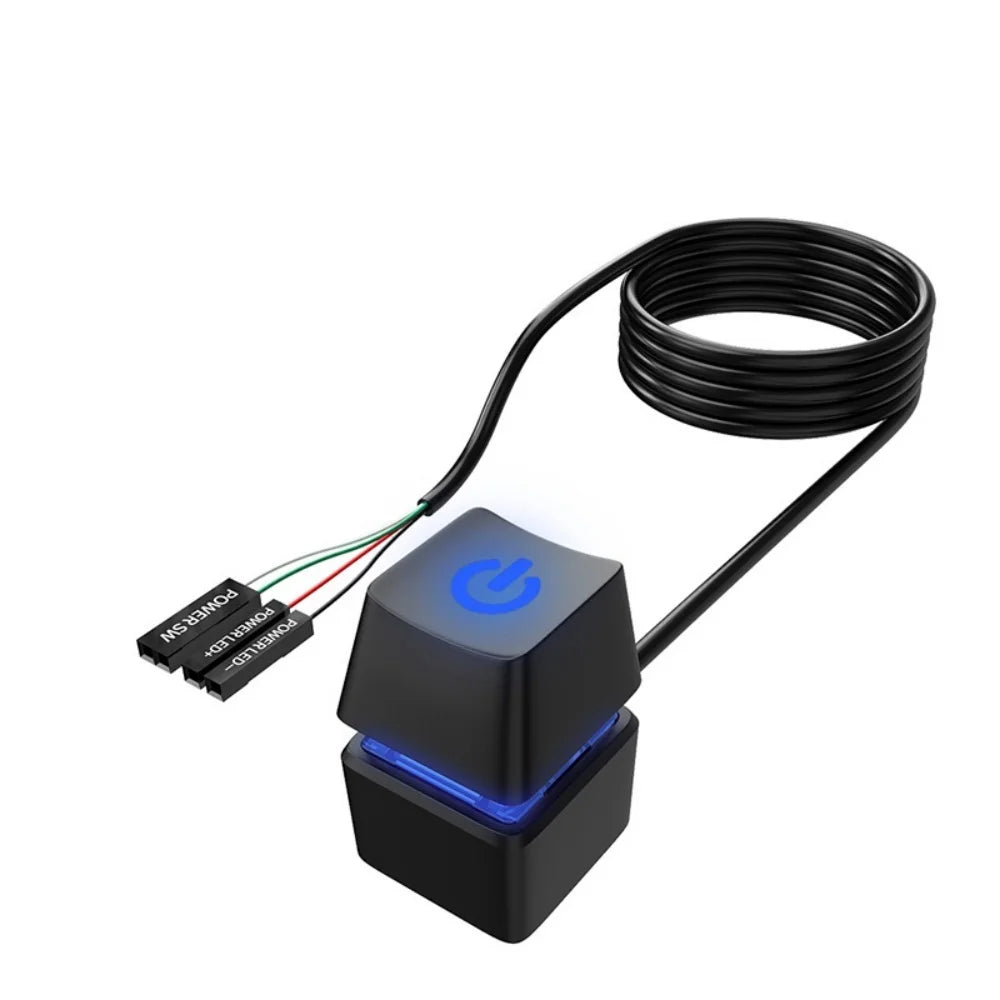
PC External Power Button Blue LED Switch – 2m Cable
PC External Power Button Blue LED Switch – 2m Cable
Couldn't load pickup availability
Take Control of Your Desktop PC from Anywhere on Your Desk
Tired of reaching around or under your desk to hit your computer's power button? This PC Motherboard External Power Button gives you a convenient, accessible on/off switch with a glowing LED indicator — no more awkward stretching or fumbling in the dark. With a generous 2-metre (6.5 ft) extension cable, you can place the button exactly where it suits your workflow, whether on a standing desk, in a server rack, or neatly tucked into a home office setup.
Key Features
- Blue LED Indicator Light — 7-color cycling LED lets you instantly see whether your PC is on, adding a sleek aesthetic to your setup
- 2-Metre Extension Cable — Long enough to route from inside your case to wherever you need the button on your desk
- Mechanical Switch Axis — Delivers satisfying tactile feedback with every press; axis can be swapped for different tactile sensations
- Easy Installation — Mounts cleanly using invisible adhesive bonding; no drilling or permanent modifications required
- Available in Black & White — Matches virtually any PC case or desk aesthetic
- Universal Compatibility — Connects to any standard desktop PC motherboard power header (standard 2-pin connector)
- Home & Office Ready — Perfect for home PCs, office workstations, or media center builds
Specifications
| Cable Length | 2 metres (approx. 6.5 ft) |
| LED Color | 7-color cycling (includes blue) |
| Switch Type | Mechanical axis (swappable) |
| Available Colors | Black / White |
| Installation | Invisible adhesive bonding |
| Compatibility | Standard desktop PC motherboard power header |
| Country of Origin | Made in Mainland China |
Safety & Usage Notes
- Operating temperature: normal room temperature; do not expose to sustained heat above 60°C
- Do not immerse in water or expose to moisture
- Do not strike, drop, or subject to strong impacts
- Do not modify or disassemble — internal components are not user-serviceable
- Product images are for reference; actual design may vary slightly
Complete Your Setup
Looking for more ways to upgrade your PC workspace? Check out these related products:
- 1 to 5 SATA Power Splitter Cable 18AWG | HDD SSD Extension — Keep your drives powered with ease
- 1-In-2-Out HDMI Splitter Cable 1080P 3D – TV Monitor Projector — Extend your display to multiple screens effortlessly
For more information on safe practices when working with PC components, refer to the U.S. Consumer Product Safety Commission – Electrical Safety resources.
Learn more: Computer case
Frequently Asked Questions
Q: Is this PC external power button compatible with all desktop motherboards?
A: Yes — this external power button uses a standard 2-pin connector that is compatible with virtually all modern desktop PC motherboards. Simply plug it into the power header pins on your motherboard (the same pins your case's built-in power button uses) and you're ready to go.
Q: How does the LED light work on this external PC power button?
A: The LED light cycles through 7 colors and illuminates when your PC is powered on, giving you a clear visual indicator of your system's status. The default prominent color is blue, but it transitions through multiple hues for a dynamic look.
Q: How do I install this external desktop power button?
A: Installation is straightforward. Route the 2-metre cable from your motherboard's power header pins to your preferred button location on your desk. Use the included invisible adhesive bonding to mount the button securely to any flat surface — no drilling required. It takes just a few minutes and requires no tools.
Q: Can I use this switch button with a laptop or server?
A: This switch is designed specifically for standard desktop PC motherboards that use a 2-pin power header. It is not compatible with laptops. Compatibility with servers depends on whether the server motherboard has a standard 2-pin power switch header — check your server's documentation before purchasing.