Peaceful Pleasures Health and Wellness
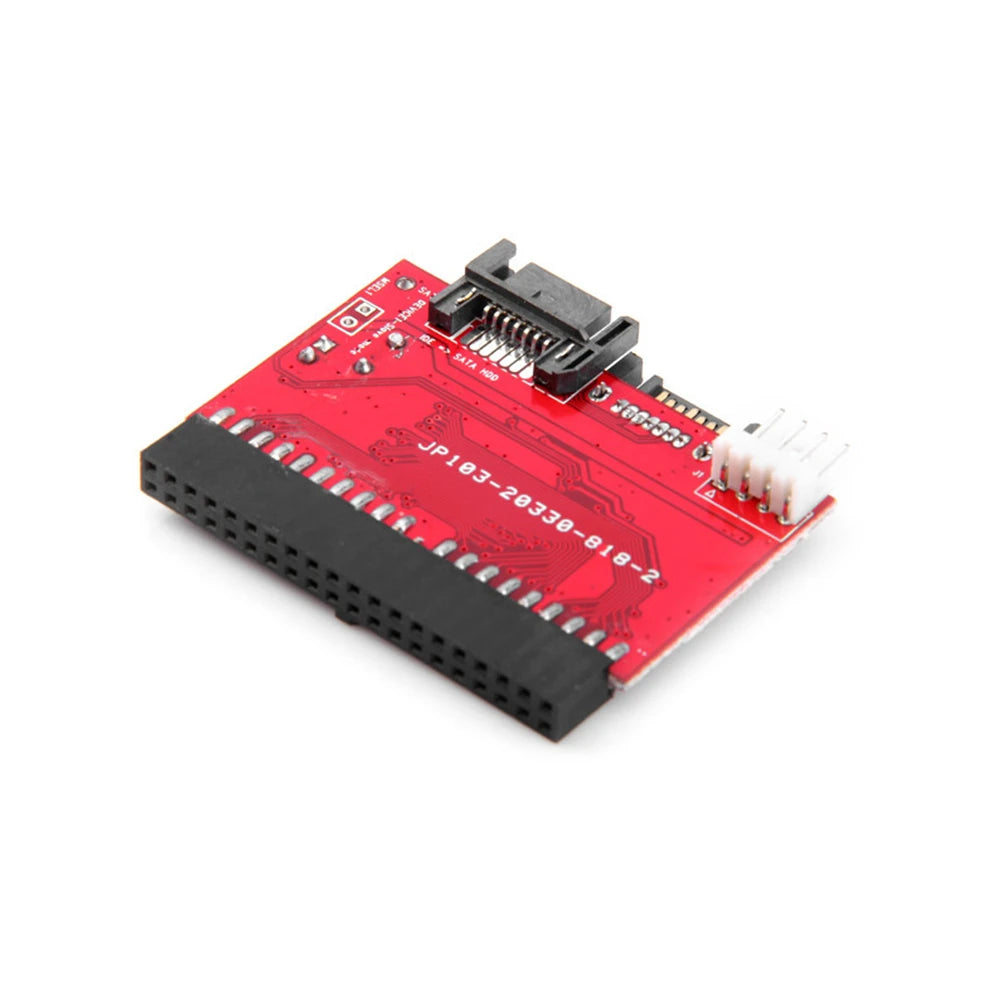
Bidirectional IDE to SATA Adapter Converter Card – PCB+Metal
Bidirectional IDE to SATA Adapter Converter Card – PCB+Metal
Couldn't load pickup availability
Bidirectional IDE to SATA / SATA to IDE Adapter Converter Card
Breathe new life into older hardware with this compact, plug-and-play IDE to SATA bidirectional conversion card. Whether you need to connect a modern SATA hard drive to a legacy IDE motherboard, or vice versa, this durable PCB+Metal adapter makes the job effortless — no drivers required.
Key Features
- True Bidirectional Conversion: Works both IDE → SATA and SATA → IDE, giving you maximum flexibility for upgrades and system builds.
- High-Speed Transfer: Supports Serial ATA transfer rates up to 1.5 Gbps (150 MB/s) — fast enough for everyday storage tasks.
- Wide Compatibility: Compliant with Serial ATA 1.0 and Ultra ATA 100/133 specifications. Supports IDE hard drives larger than 240GB.
- No Driver Needed: Simply plug in and go. Compatible with Windows 98/98SE/ME/2000/XP/Win7/Win10 and Mac OS 8.6 and above.
- Compact & Sturdy Build: Made from high-quality PCB and metal at just 5.4 × 4.5 × 1 cm — minimal footprint, no wasted space inside your case.
- 40-Pin IDE / SATA / 4-Pin Interface: Includes SATA data cable and power adapter cable in the box for a complete setup.
Specifications
| Material | PCB + Metal |
| Color | Red |
| Dimensions | 5.4 × 4.5 × 1 cm |
| Interface | 40-Pin IDE / SATA / 4-Pin Power |
| Transfer Rate | Up to 1.5 Gbps (150 MB/s) |
| OS Support | Windows 98–Win10, Mac OS 8.6+ |
| Driver Required | No |
| Country of Origin | Made in Mainland China |
How to Connect
- Plug the adapter's IDE jack into your motherboard's IDE interface (ensure correct pin alignment — note the IDE on this card is slightly smaller than a standard hard-disk IDE interface).
- Connect the included SATA data cable from the adapter to your SATA hard drive.
- Use the included power adapter cable (or a floppy drive power connector) to power the adapter from your PC's power supply.
- Connect the SATA hard drive's power using the appropriate power connector from your chassis.
- Power on — the drive should be detected automatically. If not, check BIOS settings to ensure IDE interface auto-detection is enabled.
Related Products You May Like
- 1-In-2-Out HDMI Splitter Cable 1080P 3D – TV Monitor Projector
- 1.8M DisplayPort to HDMI Cable 4K DP Adapter – PC TV Monitor
- 1-In-2-Out HDMI Splitter Cable 1080P | PC, PS4, Xbox, TV
Authoritative Resource
For guidance on computer hardware standards and storage interface specifications, visit the National Institute of Standards and Technology (NIST).
Frequently Asked Questions
Q: Can this IDE to SATA adapter work in both directions — SATA to IDE and IDE to SATA?
A: Yes! This is a true bidirectional IDE to SATA converter card. You can use it to connect a SATA hard disk to an IDE motherboard interface, or connect an IDE hard drive to a SATA interface, making it extremely versatile for PC upgrades and legacy system builds.
Q: Do I need to install drivers to use this IDE SATA conversion card?
A: No driver installation is required. This IDE to SATA adapter is completely plug-and-play and is compatible with Windows 98 through Windows 10, as well as Mac OS 8.6 and above, right out of the box.
Q: What should I do if my SATA hard drive is not recognised after installing the adapter?
A: First, double-check that both the SATA data cable and the power cable are securely connected to both the adapter and the hard drive. Then enter your system BIOS and ensure the IDE interface is set to auto-detect storage devices. Also verify that the 40-pin IDE connector is properly aligned on the motherboard — misalignment by even one row is a common cause of non-detection.
Q: What hard drive sizes does this bidirectional SATA to IDE adapter support?
A: This conversion card supports IDE drives larger than 240GB and is compliant with Ultra ATA 100/133 and Serial ATA 1.0 specifications, making it suitable for a wide range of legacy and modern hard drives.