Peaceful Pleasures Health and Wellness
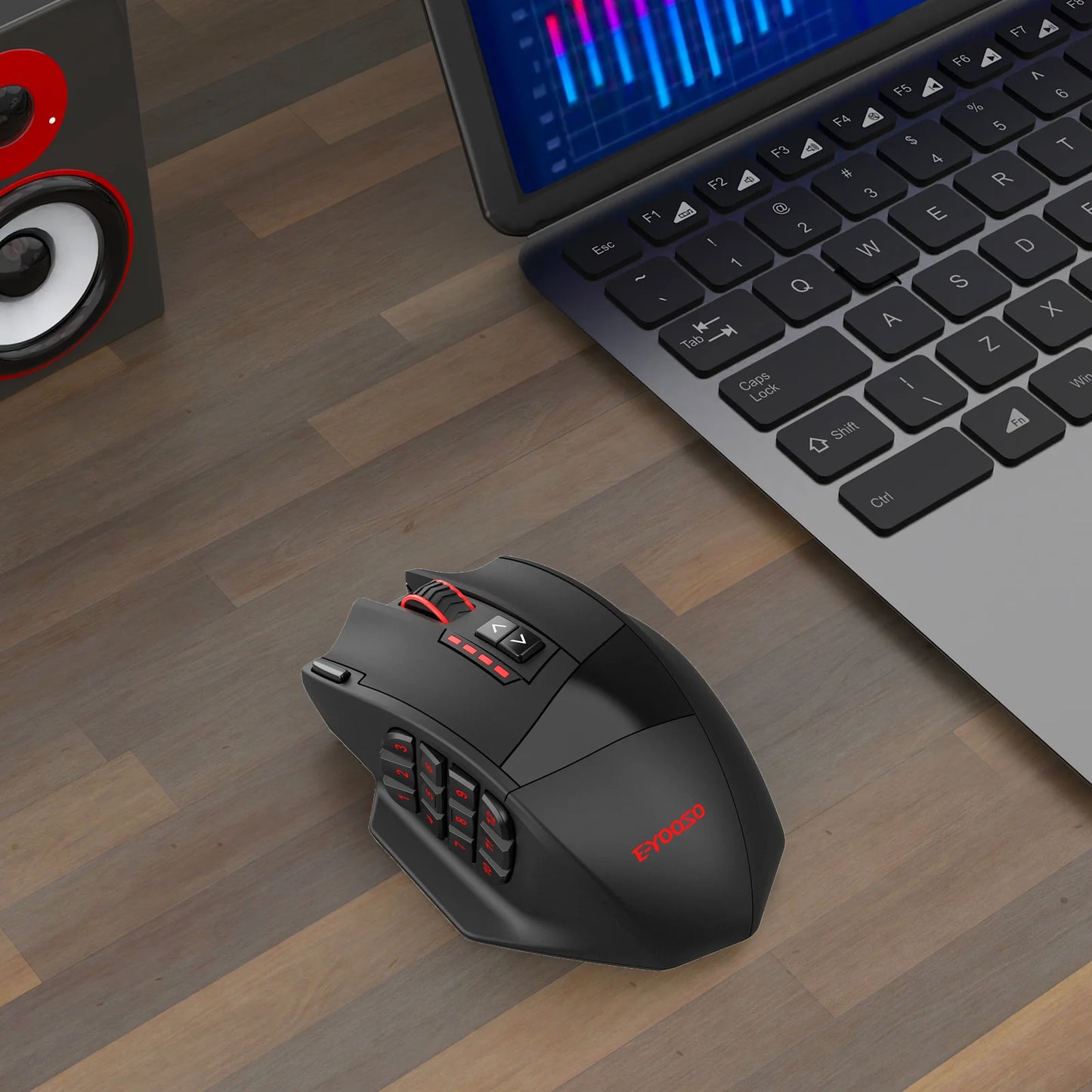
E-YOOSO X-33 Dual Mode Gaming Mouse 16000 DPI RGB Wireless
E-YOOSO X-33 Dual Mode Gaming Mouse 16000 DPI RGB Wireless
Couldn't load pickup availability
E-YOOSO X-33 Dual Mode Gaming Mouse — Precision, Speed & Freedom
Take your gameplay to the next level with the E-YOOSO X-33 Dual Mode Gaming Mouse. Switching seamlessly between 2.4G wireless and wired USB modes, this high-performance mouse gives you the flexibility to play the way you want — cable-free for desk freedom or wired for zero-latency competition. Packed with a professional-grade sensor, vivid RGB lighting, and 16 programmable buttons, the X-33 is built for gamers who demand more from their gear.
🎮 Why Gamers Love the E-YOOSO X-33
- Pixart 3335 Sensor — Industry-trusted optical sensor delivering up to 16,000 DPI, 400 IPS tracking speed, and 40G acceleration for pinpoint accuracy in every genre.
- Dual Connectivity — Toggle between 2.4GHz wireless (virtually lag-free) and wired USB mode in seconds. No dongle hassle, no signal drops.
- 16 Programmable Buttons — Map macros, commands, and shortcuts exactly how you want them. Dominate MMOs, shooters, and strategy games with total control at your fingertips.
- Vivid RGB Lighting — Customize your setup with dynamic RGB illumination that syncs beautifully with your battlestation aesthetic.
- Ergonomic Right-Hand Design — Sculpted for right-handed users, the X-33 supports long gaming sessions with a comfortable, natural grip.
- CE & RoHS Certified — Meets international safety and environmental standards so you can game with peace of mind.
📋 Technical Specifications
| Sensor | Pixart 3335 |
| Max DPI | 16,000 DPI |
| Tracking Speed | 400 IPS |
| Acceleration | 40G |
| Connectivity | 2.4GHz Wireless & Wired USB |
| Number of Buttons | 17 (16 Programmable) |
| Hand Orientation | Right-Handed |
| Operation Mode | Opto-electronic |
| Interface | USB |
| Power Source | Battery (not included) |
| Certification | CE, RoHS |
| Country of Origin | Made in Mainland China |
🖱️ Who Is This Mouse For?
Whether you're a competitive FPS player who needs pixel-perfect aim, an MMO enthusiast juggling dozens of hotkeys, or a casual gamer who simply wants a premium wireless experience, the E-YOOSO X-33 delivers. Its versatile dual-mode connectivity and extensive button layout make it one of the most adaptable gaming mice on the market today.
🔗 Complete Your Gaming Setup
Looking to upgrade other parts of your setup? Check out these related products from our store:
- "1% Better Every Day" Motivational Canvas Wall Art Print — Inspire your gaming space.
- "Best Seat In The House" Retro Quote Canvas Wall Art Print — Perfect for any gamer's room.
📚 Learn More
For guidance on safe and ergonomic computer peripheral use, visit the CDC's Workplace Ergonomics Resource for best practices on healthy computing habits.
Frequently Asked Questions
Q: Does the E-YOOSO X-33 gaming mouse work with both Windows and Mac?
A: The E-YOOSO X-33 uses a standard USB interface and 2.4GHz wireless receiver, making it broadly compatible with Windows PCs. Mac compatibility may vary depending on software features — the physical mouse functions typically work plug-and-play, but advanced macro programming may require the dedicated software on a Windows system.
Q: What batteries does the E-YOOSO X-33 require, and are they included?
A: The X-33 is powered by a battery (battery type detailed in the included user manual). Please note that batteries are not included in the package, so you will need to supply your own before first use.
Q: How do I switch between 2.4G wireless and wired USB mode on the X-33?
A: The E-YOOSO X-33 features a dedicated mode-switching function. Simply connect the USB cable for wired mode or plug in the 2.4GHz wireless dongle and toggle the switch for wireless operation. Refer to the included user guide for the exact button/switch location on your unit.
Q: Can I adjust the DPI on the E-YOOSO X-33 gaming mouse?
A: Yes! The X-33 features adjustable DPI settings powered by the Pixart 3335 sensor, allowing you to fine-tune sensitivity up to 16,000 DPI. You can cycle through preset DPI levels using the dedicated DPI button on the mouse, making it easy to switch between precise low-DPI aiming and fast high-DPI movements on the fly.