Peaceful Pleasures Health and Wellness
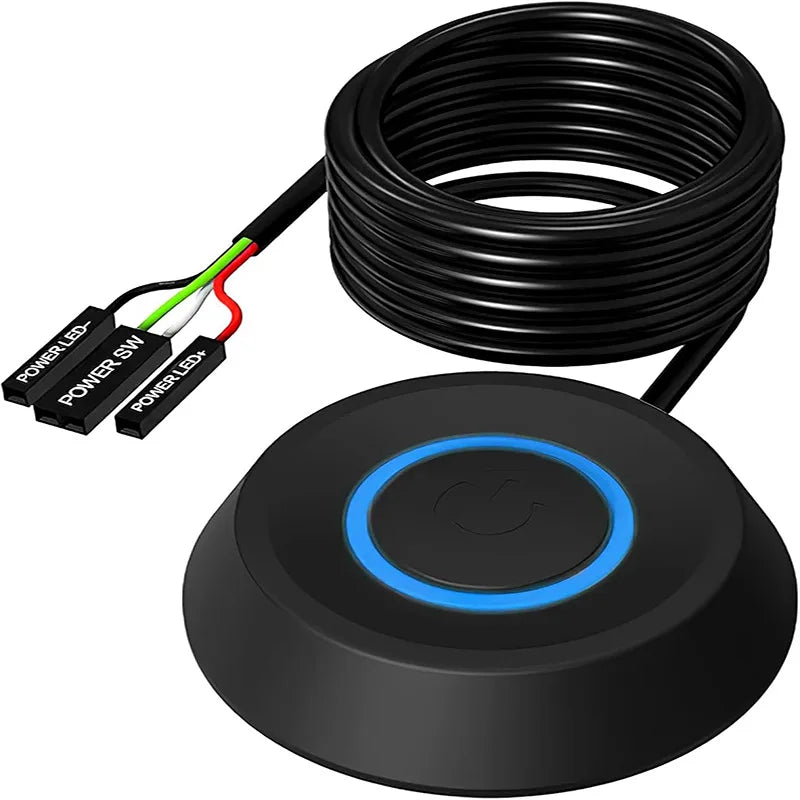
Desktop PC External Power Switch – Blue LED & 2m Cable
Desktop PC External Power Switch – Blue LED & 2m Cable
Couldn't load pickup availability
Control Your PC Power from Your Desktop – No Reaching Required
Tired of reaching behind or under your desk just to turn on your computer? This Desktop PC External Power Switch lets you power your computer on or off from the convenience of your desk surface. With a glowing blue LED indicator, a satisfying tactile click, and a generous 2-metre abrasion-resistant extension cable, this compact switch is the simple upgrade every home office or gaming setup needs.
Whether your PC tower is tucked away in a cabinet, under a deep desk, or in a hard-to-reach corner, this external switch plugs directly into your motherboard's front-panel header — no tools, no technical expertise required.
Key Features
- Blue LED Power Indicator – Instantly see whether your PC is on at a glance
- 2m Durable Extension Cable – Abrasion-resistant wire gives you plenty of reach to place the switch wherever is most convenient
- Sensitive Click Mechanism – Responsive, tactile button press with every use
- Choice of Styles – Available in round and mechanical keycap options to suit your desk aesthetic
- Motherboard-Compatible Connectors – Standard front-panel header connector fits the vast majority of desktop motherboards
- Easy Installation – Simply plug into your existing motherboard power header; no wiring or soldering needed
- Desk-Friendly Design – Compact, lightweight, and low-profile so it sits neatly on your workspace
- Multi-Scenario Use – Ideal for home offices, gaming setups, media centers, server rooms, and more
- Replacement Ready – Can also serve as a direct replacement if your original case power button is damaged
Compatibility Notes
- Desktop PCs / Assembly Builds: Compatible with virtually all custom-built desktop computers out of the box.
- Lenovo, Dell, HP Brand PCs: These brands may require an additional adapter cable (not included) due to proprietary front-panel connectors. Please verify your motherboard's header type before purchasing.
- Laptops: This switch is designed for desktop PCs only and is not compatible with laptops.
- Keep Your Original Button: Opt for the one-to-two power cable variant to retain your original case power button while also using this external switch.
What's in the Box
- 1 × External PC Power Switch with Blue LED
- 1 × 2m Extension Cable with Motherboard Connector
Made in Mainland China.
Upgrade Your Setup
Pair this power switch with other desk-friendly accessories to take your workstation to the next level. Check out our 10 Pack LED Motion Sensor Cabinet Light for easy under-desk lighting, or browse our Tuya WiFi Smart Relay Switch for full smart-home automation of your workspace.
Frequently Asked Questions
Q: What is a desktop PC external power switch and how does it work?
A: A desktop PC external power switch is an extension of your computer's built-in power button. It connects directly to your motherboard's front-panel power header (the same connector your case's original power button uses) and lets you place a secondary power button anywhere on or near your desk. When you press it, it sends the same signal as your original case button — turning your PC on, initiating sleep, or triggering a soft shutdown depending on your OS settings.
Q: Will this external PC power switch work with my branded PC (Dell, HP, Lenovo)?
A: Most Lenovo, Dell, and HP desktops use proprietary front-panel connectors that differ from standard motherboard headers. An additional adapter cable is typically required for these brands. Custom-built and assembly PCs with standard ATX motherboards are compatible without any extras. Always check your motherboard's manual or front-panel header pinout before purchasing.
Q: Can I still use my original case power button after installing this switch?
A: Yes! If you select the one-to-two (1-to-2) power cable option, both your original chassis power button and the new external switch will remain fully functional at the same time. This gives you maximum flexibility.
Q: How long is the cable and can I extend it further?
A: The included cable is 2 metres (approximately 6.5 feet) long, which is sufficient for most desk setups. If you need additional length, standard 2-pin front-panel header extension cables are widely available and can be daisy-chained.
Q: Is installation difficult? Do I need any tools?
A: Installation is very straightforward. Simply locate your motherboard's front-panel power header (labelled PWR SW or similar in your motherboard manual), disconnect the existing connector, plug in the extension cable from this switch, and route the cable to your desired desktop position. No soldering, no special tools, and no technical background is required.