Peaceful Pleasures Health and Wellness
Bluetooth Remote for iPhone & Android | Selfie, Scroll & eBook
Bluetooth Remote for iPhone & Android | Selfie, Scroll & eBook
Couldn't load pickup availability
Control Your Phone Wirelessly — Selfies, Scrolling, eBooks & More
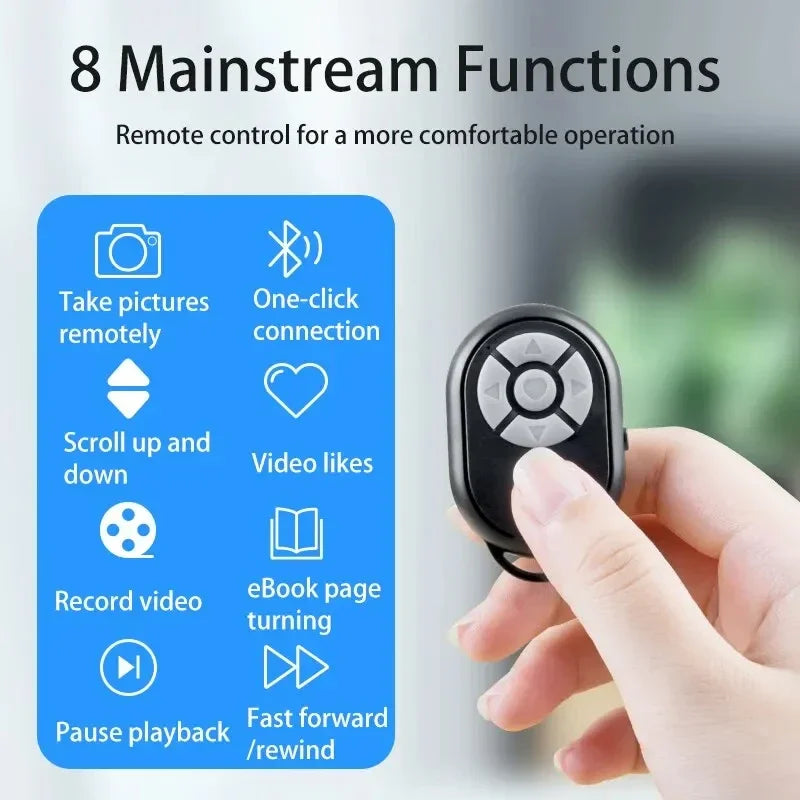
Meet your new favorite pocket gadget. This compact Bluetooth wireless remote control lets you snap hands-free selfies, scroll through TikTok or Instagram videos, flip eBook pages, and control media playback — all from up to 10 meters (33 feet) away. Compatible with virtually any iPhone or Android device, it pairs in seconds with a single click and fits on a lanyard for everyday carry.
Whether you're a content creator, a hands-free reader, or just tired of awkwardly tapping your screen during videos, this little remote handles it all with ease. Made in Mainland China.
Key Features
- 📸 Wireless Camera Shutter — take perfect selfies or group shots without touching your phone
- 📱 Video Scroll & Like Function — scroll feeds, like posts, and navigate content hands-free
- 📖 E-Book Page Turner — flip pages in Kindle, Apple Books, and more without holding your phone
- ▶️ Media Play/Pause & Navigation — control music and video playback effortlessly
- 📡 10-Meter Bluetooth Range — freedom to move without staying glued to your device
- 🍎🤖 Universal iOS & Android Compatibility — works with iPhone, Xiaomi, Samsung, and most popular Android phones
- 🔗 One-Click Easy Pairing — connects instantly to your phone via Bluetooth (device name: BLE-M3)
- 🪢 Compact Lanyard Design — ultra-portable and easy to carry anywhere
- 📲 Compatible with Most Popular Apps — TikTok, Instagram, YouTube, Kindle, camera apps, and more
How to Pair Your Remote
- Flip the side switch to ON — the indicator light will begin flashing.
- Open Bluetooth settings on your phone.
- Search for and select "BLE-M3" from the device list.
- Once connected, the indicator light will stop flashing. You're ready to go!
Important Notes
- iPhone users on iOS 15+: If the remote doesn't respond, enable AssistiveTouch: go to Settings → Accessibility → Touch → AssistiveTouch → On, then enable "Execute Touch Gestures" and set Tracking Sensitivity to at least 50%.
- Camera focus point: Due to varying screen sizes, you may need to adjust the touch point — long-press the camera button and use directional keys to reposition.
- Connection issues? Delete the pairing from your Bluetooth settings, power off the remote, restart it, then re-pair.
Perfect For
- Content creators & vloggers
- Fitness enthusiasts following workout videos
- eBook readers who want a page-turning experience
- Presentations and remote slide control
- Anyone who wants hands-free phone control
Looking for more accessories for your devices? Check out our Selfie Sticks & Tripods and our popular content creator accessories. For compatible photography gear, explore our Camera & Video Accessories collection.
For more information on Bluetooth technology and wireless connectivity, visit the FDA's resource on wireless devices.
Frequently Asked Questions
Q: Is this Bluetooth remote compatible with my iPhone?
A: Yes! This Bluetooth wireless remote is compatible with virtually all iPhone models. If you're using iOS 15 or later, you may need to enable AssistiveTouch in Accessibility settings for full functionality. Simply go to Settings → Accessibility → Touch → AssistiveTouch and turn it on.
Q: What can I use this remote for besides selfies?
A: This multi-function Bluetooth remote goes far beyond selfies. You can use it to scroll videos on TikTok or Instagram, turn pages in eBook apps like Kindle or Apple Books, control media play/pause, and navigate content in most popular apps — all wirelessly from up to 10 meters away.
Q: How do I pair this Bluetooth remote to my Android phone?
A: Turn on the remote using the side switch. Open Bluetooth settings on your Android device, search for available devices, and select "BLE-M3." Once paired, the flashing indicator light will stop and you're connected. If you experience any issues, delete the pairing, restart the remote, and re-pair.
Q: How far away can I use this remote from my phone?
A: This wireless remote controller has a Bluetooth range of up to 10 meters (approximately 33 feet), giving you plenty of freedom to move around while staying in control of your device.