Peaceful Pleasures Health and Wellness
8-in-1 USB-C Hub Multiport Adapter – SD, Audio & USB 3.0
8-in-1 USB-C Hub Multiport Adapter – SD, Audio & USB 3.0
Couldn't load pickup availability
8-in-1 USB-C Hub Docking Station – Expand Your Connectivity Instantly
Turn a single USB-C port into a full workstation with this compact 8-in-1 USB-C Multiport Hub. Whether you're connecting peripherals, reading memory cards, or plugging in headphones, this versatile docking station keeps your laptop or tablet ready for anything — at home, in the office, or on the go.
8 Ports at a Glance
- USB 3.0 ×1 – Fast data transfer for flash drives, external storage & more
- USB 2.0 ×3 – Connect keyboards, mice, printers, and other peripherals
- USB-C Data Port ×1 – Additional Type-C data connectivity
- 3.5mm Audio Jack ×1 – Plug in headphones or speakers directly
- SD Card Slot ×1 – Read full-size SD cards from cameras or drones
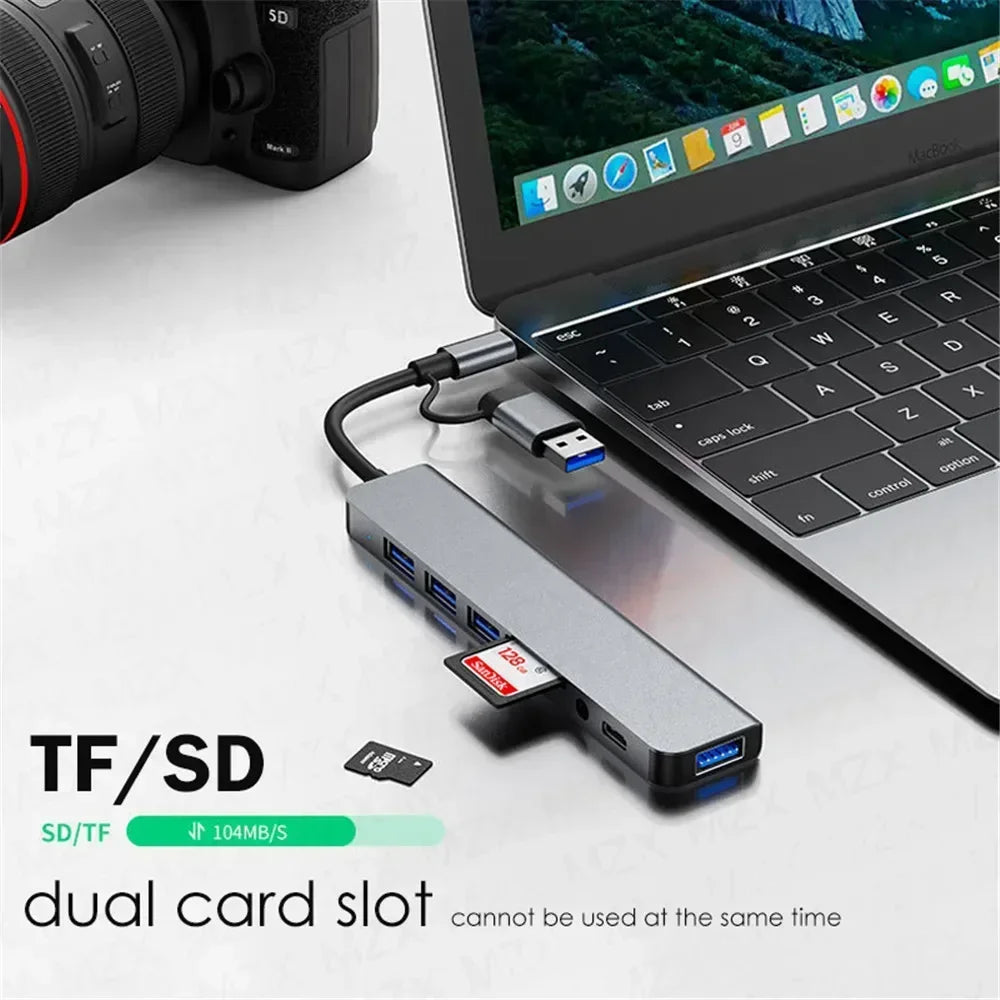
- TF / Micro SD Slot ×1 – Access micro SD cards with ease (SD & TF used one at a time)
- Combo Input: USB-A & USB-C – Works with devices that have either port type
What Can You Do With It?
- Connect a keyboard, mouse, USB flash drive, or printer simultaneously
- Read SD and Micro SD / TF cards from digital cameras or action cams
- Use with devices that have USB-A or USB-C — the combo input has you covered
- Plug in wired headphones or a speaker via the 3.5mm audio port
Wide Device Compatibility
This hub is designed to work with a broad range of USB-C laptops and tablets, including:
- Apple: MacBook 12", MacBook Pro 2016–2018, Mac Mini, MacBook Air 2018
- Xiaomi: Air 12.5", Air 13.3", Pro 15.6", Mi Game Book (8th Gen)
- Huawei: MateBook, MateBook X, MateBook X Pro, MateBook E, MateBook 13
- Dell: XPS 13, XPS 15
- Lenovo: Yoga 5 Pro, Yoga 900, ThinkPad X1 Carbon 2017, Xiaoxin Air 12"
- HP: Spectre 13, EliteBook Folio G1, Envy 13, Pavilion x2
- ASUS: U306, U321 Series, U4100
- Samsung: NoteBook & Galaxy Book Series
- Google: Chromebook Pixel, PixelBook
- Microsoft: Surface Book 2, Surface GO
- Razer: Blade Stealth
- And many more USB-C enabled devices
Not sure if your device is compatible? Contact us before purchasing to confirm.
Important Usage Notes
- SD and Micro SD / TF card slots cannot be used simultaneously
- Cannot power or read external hard drives over 2TB or those requiring more than 5V/900mA
- Operating temperature: approximately 40°C / 104°F
- If USB devices show connection issues, switching your Wi-Fi to 5GHz can reduce interference with USB 3.0
Made in Mainland China.
Explore More from Our Store
- "1% Better Every Day" Motivational Canvas Poster | Wall Art
- "Everything Is Figureoutable" Sage Green Quote Canvas Wall Art
For more information on USB standards and safe use of electronics, visit the U.S. Consumer Product Safety Commission (CPSC) for guidance on electronic device safety.
Frequently Asked Questions
Q: Does this 8-in-1 USB-C hub work with MacBook Pro and MacBook Air?
A: Yes! This USB-C multiport adapter is compatible with MacBook Pro (2016–2018), MacBook Air 2018, and MacBook 12". Simply plug the USB-C or USB-A combo input into your MacBook's USB-C port to get started.
Q: Can I use the SD card and Micro SD / TF card slots at the same time?
A: No — the SD and TF/Micro SD card slots are designed for use one at a time. Insert only one memory card at a time to ensure proper reading and data transfer performance.
Q: What is the maximum external hard drive size this hub supports?
A: This USB-C hub supports external hard drives up to 2TB that are bus-powered (no external power source required). Hard drives requiring more than 5V/900mA power or exceeding 2TB capacity are not supported. Self-powered drives with their own power adapter may also have limitations.
Q: My USB devices are cutting out — what can I do?
A: USB 3.0 can sometimes interfere with 2.4GHz Wi-Fi signals. Switching your router or device Wi-Fi to the 5GHz band typically resolves this issue and ensures stable connectivity across all ports.