Peaceful Pleasures Health and Wellness
5-in-1 USB-C Hub 4K HDMI 100W PD for Steam Deck & Switch
5-in-1 USB-C Hub 4K HDMI 100W PD for Steam Deck & Switch
Couldn't load pickup availability
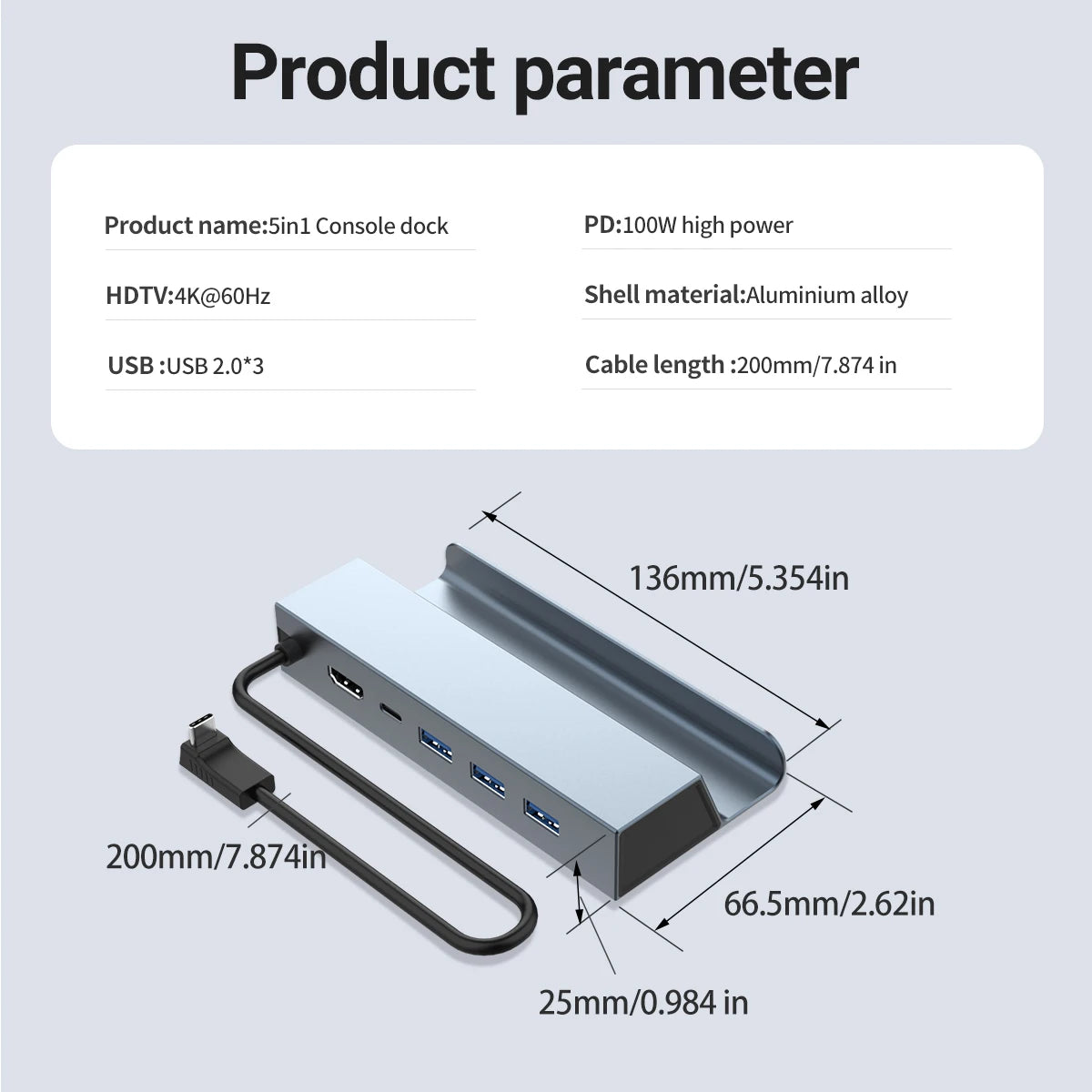
5-in-1 USB-C Game Hub – 4K@60Hz HDMI, 100W PD, 3x USB 2.0
Take your gaming setup to the next level with this compact 5-in-1 USB-C Docking Station. Designed for gamers and power users alike, it delivers crystal-clear 4K@60Hz HDMI output, 100W Power Delivery fast charging, and three USB 2.0 ports — all through a single USB-C connection. Perfect for Steam Deck, Nintendo Switch / Switch OLED, ROG Ally, iPad, MacBook, and any device with a USB-C 3.1 or higher interface.
Made in Mainland China.
Key Features
- 4K@60Hz HDMI Output – Mirror or extend your screen to any HDTV, monitor, or projector in stunning ultra-high definition.
- 100W USB-C Power Delivery (PD) – Fast-charge your Steam Deck, Switch OLED, MacBook, or other USB-C devices while you play. (PD port is for charging only; USB 2.0 ports are for data transfer, not charging.)
- 3x USB 2.0 Ports – Connect mice, keyboards, controllers, flash drives, and other peripherals simultaneously.
- Broad Device Compatibility – Works seamlessly with Steam Deck, Nintendo Switch / Switch OLED, ROG Ally, iPad Pro, MacBook Pro/Air, Samsung Galaxy S24/S23/S22, and more — requires USB-C 3.1 or higher.
- Compact & Portable – Slim, pocket-friendly design is ideal for gaming on the go, at a friend's house, or in a hotel room.
- Plug-and-Play – No drivers or software needed. Simply plug in and start gaming or working.
⚠️ Important Usage Notes
- Nintendo Switch TV Mode: Connect your original Nintendo charger to the hub's PD port first, then connect the HDMI cable. The Switch's main screen will go black — this is normal. Your display will then receive the cast signal.
- USB 2.0 Ports: These ports are for data transmission only — they do not charge connected devices.
- PD Charging: The 100W PD port is recommended for game consoles such as Switch OLED and Steam Deck.
- USB-C Requirement: This hub only supports devices with a USB-C 3.1 or higher interface.
Specifications
- Model: GAME HUB 5-in-1
- Ports: 1x HDMI (4K@60Hz), 1x USB-C PD (100W), 3x USB 2.0
- HDMI Resolution: Up to 4K @ 60Hz
- PD Charging: Up to 100W
- USB Standard Required: USB-C 3.1 or higher
- Compatible Devices: Steam Deck, Nintendo Switch / Switch OLED, ROG Ally, iPad Pro, MacBook Pro/Air, Samsung Galaxy S22/S23/S24, and more
Related Products You May Like
- 1-In-2-Out HDMI Splitter Cable 1080P 3D – TV Monitor Projector
- 1.8M DisplayPort to HDMI Cable 4K DP Adapter – PC TV Monitor
- 1 to 5 SATA Power Splitter Cable 18AWG | HDD SSD Extension
For more information on USB standards and connectivity, visit the National Institute of Standards and Technology (NIST).
Frequently Asked Questions
Q: Is this USB-C docking station compatible with Nintendo Switch in TV mode?
A: Yes! To use TV mode with the Nintendo Switch, connect your original Nintendo charger to the hub's 100W PD port first, then plug in your HDMI cable to your TV. The Switch screen will go black momentarily before the image appears on your TV. This docking station fully supports Nintendo Switch and Switch OLED TV mode.
Q: Can I charge my Steam Deck or ROG Ally while gaming through this hub?
A: Absolutely. The 100W USB-C Power Delivery port allows you to fast-charge your Steam Deck, ROG Ally, or Switch OLED simultaneously while using the HDMI and USB 2.0 ports. This makes it the perfect all-in-one gaming hub for extended play sessions.
Q: What devices are compatible with this 5-in-1 USB-C docking station?
A: This hub is compatible with any device featuring a USB-C 3.1 or higher interface. This includes the Steam Deck, Nintendo Switch/Switch OLED, ASUS ROG Ally, iPad Pro, MacBook Pro, MacBook Air, and Samsung Galaxy S22/S23/S24 series. It does NOT support older USB-C 2.0 devices.
Q: Can I connect multiple peripherals at once using the USB 2.0 ports?
A: Yes. The three USB 2.0 ports allow you to connect multiple peripherals simultaneously — such as a keyboard, mouse, and USB flash drive. Please note these ports support data transfer only and do not provide charging power to connected devices.