Peaceful Pleasures Health and Wellness
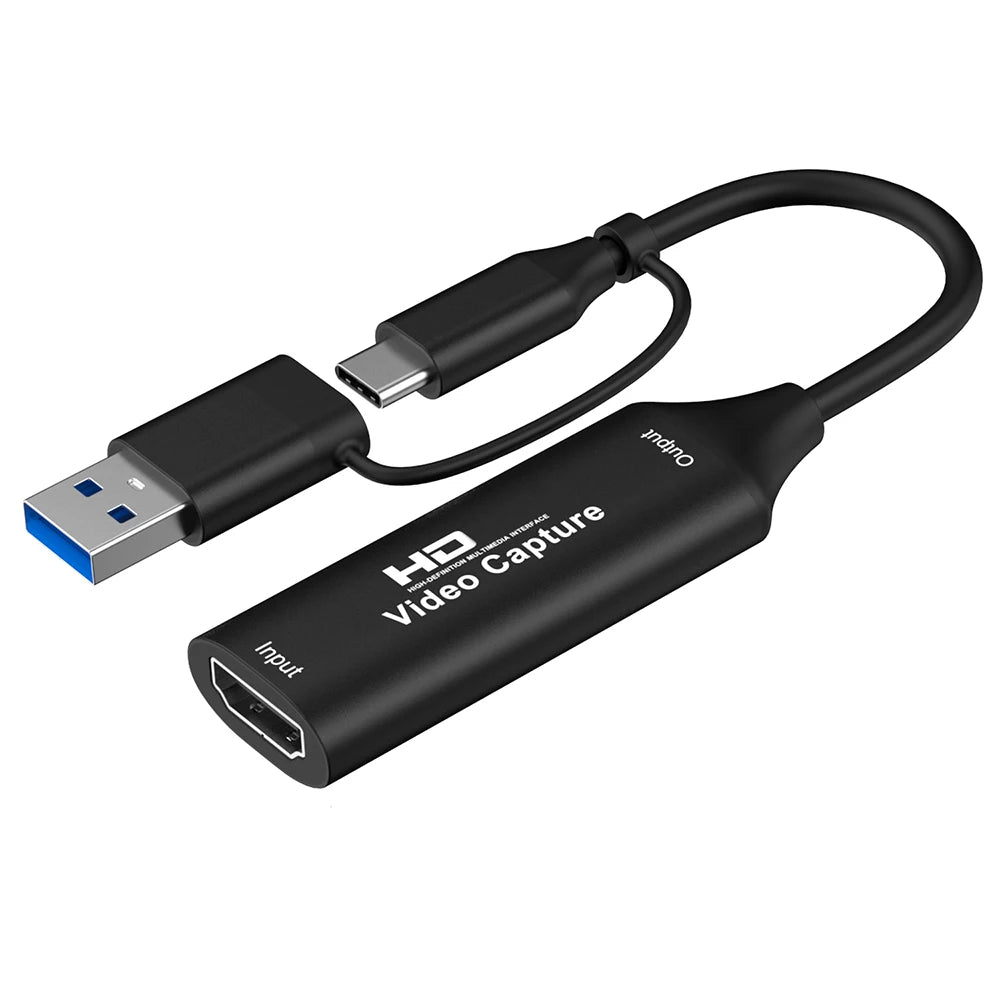
4K HDMI Capture Card USB-A/USB-C for OBS, PS4, Xbox, Switch
4K HDMI Capture Card USB-A/USB-C for OBS, PS4, Xbox, Switch
Couldn't load pickup availability
4K HDMI Video Capture Card – USB-A & USB-C for OBS, PS4, Xbox, Switch & More
Take your live streaming, game recording, and content creation to the next level with this compact 4K HDMI Video Capture Card. Whether you're broadcasting on Twitch, recording gameplay on PS4, Xbox, or Nintendo Switch, or capturing footage from a camera or set-top box, this plug-and-play device makes it effortless. With both USB-A and USB-C interfaces included, it's compatible with virtually any modern laptop or desktop.
Made in Mainland China.
Key Features
- 4K Input / 1080P Output: Accepts up to 4K@30Hz input and outputs crisp 1080P@60Hz video — every detail captured beautifully.
- Dual Interface (USB-A & USB-C): Works with a wider range of computers and devices without needing extra adapters.
- Plug-and-Play: No drivers or external power supply needed — just plug in and start recording immediately.
- Uncompressed Capture: Supports YUY2 1080P@60Hz uncompressed acquisition via USB 3.0 for broadcast-quality footage.
- Deep Color Support: Supports 24/30/36-bit deep color for vivid, true-to-life visuals.
- Wide Software Compatibility: Works seamlessly with OBS Studio, VLC, Amcap, Potplayer, QuickTime, XSplit, and more.
- Multi-Platform Support: Compatible with Windows 8/10, macOS, Linux, and Android.
- UVC & UAC Standard: Conforms to USB Video Class (UVC) and USB Audio Class (UAC) standards for universal compatibility.
- Long Cable Support: Supports AWG26 HDMI standard cable input up to 15 meters (at 1080P and below).
- Compact & Portable: Lightweight and pocket-sized — perfect for streamers on the go.
What Can You Capture?
This capture card is compatible with a wide range of HDMI-output devices, including:
- Game Consoles: PS4, Xbox One, Nintendo Switch, Wii U
- Computers & Monitors
- Cameras & Camcorders
- DVD Players, TV Boxes, & Set-Top Boxes
- Mobile & Tablet devices (via HDMI adapter)
Perfect for Dual-PC Streaming Setups
Run your game on one PC while recording or streaming lag-free on another. No CPU strain, no dropped frames — just smooth, uninterrupted live content. Also ideal for teaching recordings, medical imaging, and professional video production.
Technical Specifications
- Input Resolution: Up to 4K @ 30Hz
- Output Resolution: Up to 1080P @ 60Hz
- Color Depth: 24/30/36-bit deep color
- Interface: HDMI Input → USB-A / USB-C Output
- Standards: UVC (USB Video Class), UAC (USB Audio Class)
- OS Support: Windows 8/10, macOS, Linux, Android
- Power: Bus-powered via USB (no external power required)
- Cable Support: AWG26 HDMI up to 15m (1080P)
Related Products You May Like
- Smart WiFi Relay Switch – Alexa & Google Home Compatible
- 10-Pack LED Motion Sensor Cabinet Lights – Battery Powered
Learn More
For more information on video streaming standards and USB device classes, visit the official USB Implementers Forum or explore MedlinePlus for general wellness resources related to screen time and digital health.
Want to learn more about how capture cards work with OBS? Check out the research on digital media and screen-based activities at NIH.
Frequently Asked Questions
Q: Does this 4K HDMI capture card work with OBS Studio for live streaming?
A: Yes! This capture card is fully compatible with OBS Studio, one of the most popular free live-streaming and recording platforms. Simply plug in via USB-A or USB-C, select it as your video capture source in OBS, and you're ready to stream or record in up to 1080P@60Hz.
Q: Do I need to install drivers for this capture card?
A: No drivers are required. This capture card is plug-and-play and conforms to the UVC (USB Video Class) and UAC (USB Audio Class) standards, meaning your operating system on Windows, macOS, Linux, or Android will recognize it automatically.
Q: Can I use this capture card with my PS4, Xbox, or Nintendo Switch?
A: Absolutely. This card is designed to work with HDMI-output game consoles including PS4, Xbox One, Nintendo Switch, and Wii U. Simply connect your console's HDMI output to the card's HDMI input, then plug the USB end into your PC or laptop.
Q: What is the difference between the 4K input and 1080P output?
A: The card accepts a source signal at up to 4K resolution (3840×2160) at 30 frames per second, but it captures and records the footage at up to 1080P (1920×1080) at 60 frames per second. This allows you to record high-quality, smooth footage without needing a 4K-capable recording system.
Q: Does this capture card require external power?
A: No external power supply is needed. The device is bus-powered directly through its USB connection to your computer, making it compact, portable, and hassle-free.